Typical US prices, checked October 2026. Not live prices; check the listing before you buy.
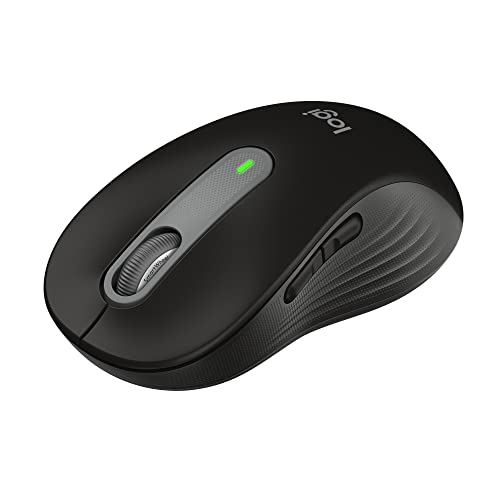
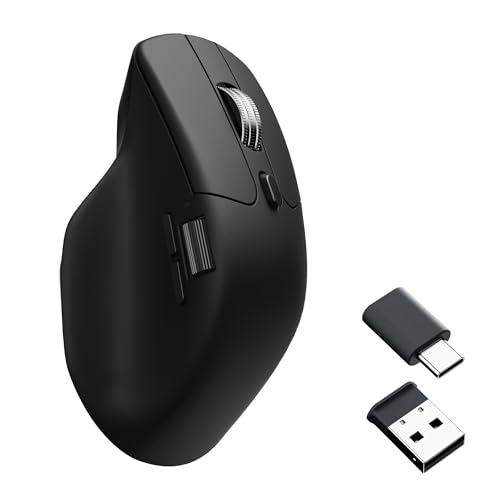
Looking for a cheaper alternative to the Logitech MX Master 4? It usually sells for about $120. Here are 6 cheaper swaps from $25: the Keychron M6 Wireless Mouse is the closest match from another brand, the Logitech MX Master 3S Bluetooth Edition is a cheaper option from Logitech and the Logitech Pebble Mouse 2 M350s is the cheapest at about $25. Each one says what you give up for the lower price.
Buying advice
Is the Logitech MX Master 4 worth it?
Worth it if you spend long days in many apps: Logitech lists an 8,000 DPI sensor that tracks on glass, the MagSpeed wheel with ratchet and fast-scroll modes, and customizable haptic feedback. Tom's Guide found it comfortable and highly customizable, and it connects over one 2.4GHz receiver and two Bluetooth channels.
When a cheaper swap makes sense
Tom's Guide found the haptics slightly gimmicky, so if you can skip them, the Logitech MX Anywhere 3S ($90) keeps the MagSpeed wheel in a travel size. If wrist strain is the issue, the Logitech Lift Vertical Ergonomic Mouse ($80) uses a vertical grip, though it suits small to medium hands.
What to compare
- Size and weight against your hand
- Thumb wheel and number of programmable buttons
- Scroll wheel type (MagSpeed or a simpler smart wheel)
- How many devices it pairs with
- Grip style: standard or vertical
Watch out for
- It's a right-handed shape, per Tom's Guide.
- Tom's Guide says the larger size may be too much for smaller hands.
- Tom's Guide found the new hard plastic finish a little less comfortable than the 3S's softer coating.
Quick answers
What is the cheapest alternative to the Logitech MX Master 4?
The Logitech Pebble Mouse 2 M350s, at about $25 (79% less). Slim, silent and pairs with up to three devices. The catch: Small, flat shape with no extra buttons.
What is the closest match to the Logitech MX Master 4?
The Keychron M6 Wireless Mouse, at about $50 (58% less). Right-handed ergonomic mouse with a side thumb wheel for horizontal scrolling, a top wheel that switches to infinite scroll, and 2.4 GHz, Bluetooth (three devices) and wired modes. The catch: No haptics or Actions Ring, and Keychron rates the battery at up to 180 hours against Logitech's up to 70 days.
Is there a cheaper Logitech option?
Yes. The Logitech MX Master 3S Bluetooth Edition, at about $100 (17% less). The previous MX Master with the same 8,000 DPI track-on-glass sensor, MagSpeed scroll wheel and Quiet Clicks, per Logitech. The catch: No haptic feedback or Actions Ring panel, and Tom's Guide found its thumb-rest gesture controls more finicky than the 4's new touch pad.
What's the difference between the MX Master 4 and the MX Master 3S?
Tom's Guide says the 4 adds haptic feedback on its touch pad, swaps the rubberized finish for hard plastic, and is a few millimetres bigger and nine grams heavier. It found core performance much the same as the 3S.
Is the MX Master 4 good for small hands?
Tom's Guide says it may be too big if the MX Master 3S is already about as large as you can handle, and lists it as a right-handed design. The Logitech MX Anywhere 3S ($90) is a smaller option with the same MagSpeed scroll wheel.
Does the MX Master 4 work on glass?
Yes. Logitech says its 8,000 DPI sensor tracks on almost any surface, including glass at least 4 mm thick.
MX Master 4 vs 3S: what does the 4 add?
Logitech lists a Haptic Sense Panel in the thumb rest with customizable haptic feedback, and the Actions Ring, an on-screen shortcut overlay set up in Logi Options+ that Logitech says cut repetitive mouse movements by up to 63% in a 37-user study. Logitech also claims twice the connectivity strength of previous models. Both keep the 8,000 DPI track-on-glass sensor and MagSpeed wheel, and Logitech's design blog says battery life stays at up to 70 days, as on the 3S. Tom's Guide found the new touch pad easier than the 3S's finicky gesture controls.
Should I buy the MX Master 3S instead of the MX Master 4?
Tom's Guide says newcomers should buy the 4 over the 3S, and 3S owners should upgrade only if they have a specific complaint about it. The Logitech MX Master 3S Bluetooth Edition ($100) keeps the 8,000 DPI sensor, MagSpeed wheel and Quiet Clicks, but has no haptic panel or Actions Ring button.
What is the best non-Logitech alternative to the MX Master 4?
The Keychron M6 Wireless Mouse ($50). Keychron lists a right-handed ergonomic shape, a side thumb wheel for horizontal scrolling, a top wheel that switches to infinite scrolling, and three Bluetooth devices plus 2.4 GHz and wired modes. It has no haptics, and Keychron rates its battery at up to 180 hours.
Where can I buy these?
Each swap links to amazon.com. Prices are typical US prices checked October 2026 and change often, so check the listing before you buy.